FIFO介绍
FIFO常被称为命名管道,以区分管道(pipe)。管道(pipe)只能用于“有血缘关系”的进程间通信。但通过FIFO,不相关的进程也能交换数据。
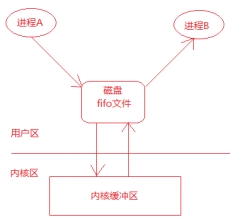
FIFO是Linux基础文件类型中的一种(文件类型为p,可通过ls -l查看文件类型)。但FIFO文件在磁盘上没有数据块,文件大小为0,仅仅用来标识内核中一条通道。进程可以打开这个文件进行read/write,实际上是在读写内核缓冲区,这样就实现了进程间通信。
创建管道
方式1-使用命令 mkfifo
命令格式:
例如:mkfifo myfifo
方式2-使用函数
1
2
3
4
5
| int mkfifo(const char *pathname, mode_t mode);
参数一是文件名
参数2是文件权限
成功返回0
失败返回-1并设置errno
|
参数说明和返回值可以查看man 3 mkfifo
当创建了一个FIFO,就可以使用open函数打开它,常见的文件I/O函数都可用于FIFO。如:close、read、write、unlink等。
FIFO严格遵循先进先出(first in first out),对FIFO的读总是从开始处返回数据,对它们的写则把数据添加到末尾。它们不支持诸如lseek()等文件定位操作。
access函数
函数声明
1
| int access(const char* pathname, int mode);
|
1
2
3
4
5
6
7
8
9
| F_OK 值为0,判断文件是否存在
X_OK 值为1,判断对文件是可执行权限
W_OK 值为2,判断对文件是否有写权限
R_OK 值为4,判断对文件是否有读权限
注:后三种可以使用或“|”的方式,一起使用,如W_OK|R_OK
|
返回值:成功0,失败-1
使用FIFO完成两个进程通信
使用FIFO完成两个进程通信的示意图
fifo_write.c
1
2
3
4
5
6
7
8
9
10
11
12
13
14
15
16
17
18
19
20
21
22
23
24
25
26
27
28
29
30
31
32
33
34
35
36
37
38
39
40
41
| #include<stdio.h>
#include<stdlib.h>
#include<unistd.h>
#include<sys/types.h>
#include<sys/stat.h>
#include<fcntl.h>
#include<string.h>
int main(int argc,char * argv[])
{
int ret = access("./myfifo",F_OK);
if(ret != 0)
{
ret = mkfifo("myfifo",0777);
if(ret < 0){
perror("mkfifo error");
return -1;
}
}
int fd = open("./myfifo",O_RDWR);
if(fd < 0){
perror("open error");
return -1;
}
char buf[128];
memset(buf,0x00,sizeof(buf));
int i = 0;
while(1)
{
sprintf(buf,"%d hello\n",++i);
write(fd,buf,strlen(buf));
sleep(1);
}
close(fd);
return 0;
}
|
fifo_read.c
1
2
3
4
5
6
7
8
9
10
11
12
13
14
15
16
17
18
19
20
21
22
23
24
25
26
27
28
29
30
31
32
| #include<stdio.h>
#include<stdlib.h>
#include<unistd.h>
#include<sys/types.h>
#include<sys/stat.h>
#include<fcntl.h>
#include<string.h>
int main(int argc,char * argv[])
{
int fd = open("./myfifo",O_RDWR);
if(fd < 0){
perror("open error");
return -1;
}
char buf[128];
int i = 0;
int len = 0;
while(1)
{
memset(buf,0x00,sizeof(buf));
len = read(fd,buf,sizeof(buf));
printf("len[%d] %s",len,buf);
}
close(fd);
return 0;
}
|