Ubuntu16.04 命令行配置网络
1. 切换root
1
2
3
| su root
sudo passwd root #首次需给root配置密码
|
2. 查看网卡信息
看见如eth0或enp5s0或ens33或ens192等就可以,比如我的是enp3s0
3. 配置系统网络
网络接口配置文件: /etc/network/interfaces
1
| vi /etc/network/interfaces
|
修改为:
1
2
3
4
5
6
7
8
9
10
11
12
13
14
15
16
17
| #无需改动
auto lo
iface lo inet loopback
#添加以下:
auto enp3s0 #开机自动连接网络(enp3s0 为网卡名称,ifconfig -a看自己的)
iface enp3s0 inet static #static表示使用固定ip,dhcp表述使用动态ip
address 192.168.1.84 #设置ip地址
netmask 255.255.255.0 #设置子网掩码
gateway 192.168.1.1 #设置网关
dns-nameservers 8.8.8.8 #设置DNS,谷歌dns
#dns-nameservers 202.106.0.20 北京市联通dns
|
4. 重启网络服务
1
| service networking restart
|
然后ifconfig 查看ip信息
没效果就 reboot重启电脑
ping www.baidu.com 如下已连通
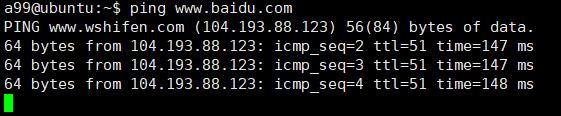
OK.