VS2017编译linux程序时,如果出错,一般会出现下面的错误提示信息:
1 | g++ exited with code 1, please see the Output Window - Build output for more details (NOTE: |
解决办法如下:
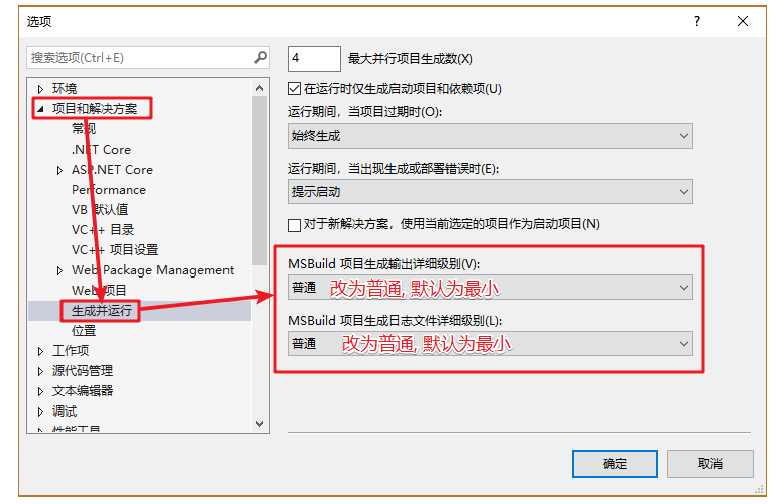
1 | VS2017 -> 工具 -> 选项 -> 项目和解决方案 -> 生成并运行,将“MSBuild项目生成输出详细级别”和“MSBuild项目 |

VS2017编译linux程序时,如果出错,一般会出现下面的错误提示信息:
1 | g++ exited with code 1, please see the Output Window - Build output for more details (NOTE: |
解决办法如下:
1 | VS2017 -> 工具 -> 选项 -> 项目和解决方案 -> 生成并运行,将“MSBuild项目生成输出详细级别”和“MSBuild项目 |
- 版权声明: 本博客所有文章除特别声明外,均采用 CC BY 4.0 CN协议 许可协议。转载请注明出处!
感谢您的支持,我会继续努力的!

扫码打赏,你说多少就多少
打开支付宝扫一扫,即可进行扫码打赏哦

扫码打赏,你说多少就多少
打开微信扫一扫,即可进行扫码打赏哦